


Brand: Canon
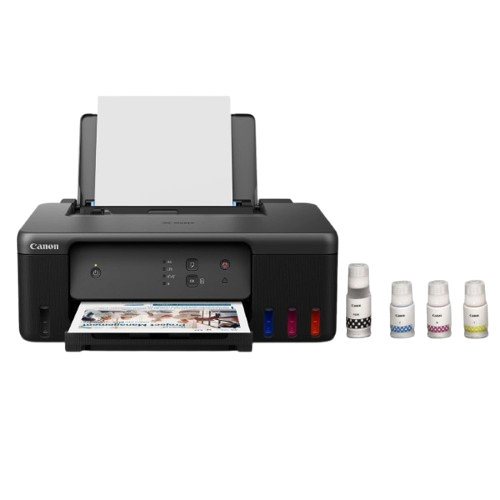
Canon PIXMA G1730 MegaTank Single Function Printer
Canon PIXMA G1730 MegaTank Single Function Printer
SKU : G1730

No Cost | Low Cost EMI Available upto 24 Months

Cancellation/Refunds fees applicable
Fees: 15% Will be deducted from Order Value!
Min Order Value ₹5000 to ₹85000 with Bajaj EMI Card.

Delivery: Express 3-5 Days! | Standard 5-7 Days!

Get upto ₹7500 Discount on Selected Banks
Couldn't load pickup availability
Printer type: Inkjet ; Functions: Print only ; Printer output: Colour ; Connectivity:USB 2.0 ; Scanner: No
OS Compatibility: Windows 11 / 10 / 8.1 / 7 SP1 (operation can only be guaranteed on a PC with a pre-installed Windows 7 or later), macOS 10.14.6 – 12 or later, Chrome OS; Mobile connectivity : No; Hardware Interface: USB 2.0 ; Enlarge/reduce option: No ; Duplex: No
Maximum Print Speed: 11/6 (mono/color) images per minute; Print cost Monochrome: Rs 0.13 ; Print cost color: Rs 0.25 ; Maximum Print Resolution: 4800 x 1200 dpi
Page size: A4, A5, A6, B5, LTR, LGL, Executive, Oficio2, B-Oficio, M-Oficio, Legal (India), Foolscap, F4, 4 x 6″, 5 x 7″, 7 x 10″, 8 x 10″, Envelopes , Square, Card Size ,Custom Size- Width: 55 – 216 mm, Length: 89 – 1,200 mm; Max paper thickness: 64 to 275 GSM ; Maximum Input Sheet Capacity: 100 sheets (A4); Compatible ink:GI 71 Cyan, Magenta, Yellow, Black; Additional Printer Function:, Print modes- Standard and Economy ; Power wattage of printer: OFF: 0.1W, Standby (scanning lamp is off):0.6W, Printing (USB connection to PC): 14W
Special Features:Small ink bottles, Borderless Print; Ideal Usage: Home, Home Office; Included Components: Printer, Power Cord, USB cable, Instruction Manual, 1 set of GI71S Cyan, Magenta, Yellow and Black ink bottles
Page Yield: GI71S BK- 3100 prints, GI71S Cyan, Magenta, Yellow- 4400 prints as per ISO/IEC 24711 (for A4 size) using ISO/IEC 24712 test file
Onsite Warranty – 1 year or 30000 prints (whichever is earlier) from the date of purchase. Use only genuine Canon ink. Using counterfeit ink will harm your printer as well as render the warranty void
Canon PIXMA G1730 Single Function (Print only) Inktank Color Printer with Small Size Ink Bottles for Home/Office
PIXMA G1730
Refillable Ink Tank Printer with small Ink Bottles
This high performance printer combines low-cost printing with easy operation and maintenance, alongside being compatible with small ink bottles for greater cost efficiency.
Print
Print Speed (A4, ISO): up to 11 / 6 images per minute (mono/colour)
USB 2.0
Recommended Monthly Print Volume: 150 – 1 500 pages
Features
GI_71_71S_v2
Inbox Small Ink Bottles
Small and standard ink bottles are available to meet the different requirement in print volume.
G1X3X_Mini_SiS_EasyBottleColor_en_570x400
Easy, Hassle-free Ink Refilling
Ink refill is now made easy. Each ink bottle nozzle is designed to fit seamlessly only into the designated ink tank, eliminating potential mixing accidents.
G1x30_SiS_MaintenanceCRG_en_570x400
Easy Maintenance
The easy-to-replace maintenance cartridge makes maintenance fuss-free and extends printer lifespan even when printing in high volumes.
SS_3_G1X3X_Mini_blk_en_570x400
Compact, Space Saving Footprint
The printer’s compact footprint allows it to fit into tight spaces with ease.
Disclaimers
To keep printer’s performance, Canon printer performs cleaning automatically according to its condition. When the printer performs cleaning, a small amount of ink is consumed. In this case, all colours of ink may be consumed.
[Cleaning function]
The cleaning function helps the printer to suck air bubbles or ink itself from the nozzle and thus prevents print quality degradation or nozzle clogging.
The repairing parts for printers will be available five years after production is discontinued. Depending on your model, we may ask you to replace it with a new model, or one with almost the same performance as a maintenance service. In this case, you may not be able to use the supplies or accessories for the model or the compatible OS will be changed.
To obtain good printing quality, use up ink within six months after opening.
Depending on your terminal, such as a computer or a smartphone, or the operating system of your terminal, such as your computer or smartphone, the estimated ink level information or message displayed on the screen of your terminal may be different from the information or message displayed on the operation panel of the printer. Also, a part of the estimated ink level message displayed on the operation panel of the printer may not be displayed and/or may be displayed at a different point in time. Canon recommends that you use the information and message displayed on the operation panel of the printer as your reference. Note, however, that such information and message are displayed items serve only as a guideline information.
Even when black-only or grayscale printing is selected, depending on the printing material and driver settings used, colour inks might still be consumed when printing. When the remaining ink level of any ink tank falls below the lower limit line, Canon recommends that you refill that ink bottle with the corresponding ink colour.
The estimated page yield and/or print cost stated in brochures/catalogs/websites etc. is/are determined not based on the initial set of bundled ink bottles, but based on subsequent sets of ink bottles after print head nozzles have been filled with ink from the initial set of ink bottles.
The warranty term for details, contact a Canon-authorized sales representative in the country or region you live in. The warranty covers only the printer main body excluding consumables such as print media and ink/ink bottles even during the warranty period.
Ink bottles sold are generally meant for use with printers sold in the same region. The ink bottles may bear unique labels or configurations and may not be compatible for use with printers sold in another region. To ensure optimal performance of your printer, please check with your local Canon office or authorised Canon reseller before relocating your printer from the location of purchase.
Using non-genuine inks may affect the printer’s performance and/or the print quality. In some rare occasions, although there are no safety issues, using non-genuine inks has caused overheating of the print head and smoke emission from the print head due to the absence of an ingredient found in genuine ink. (Does not apply to usage of all non-genuine inks).
Please take note that if the printer fault or breakdown is due to the usage of non-genuine inks, repair charges are applicable even if the claim is within the warranty period.
Depending on your terminal, such as a computer or a smartphone, or the operating system of your the terminal, such as your computer or smartphone, the information or the message related to the estimated remaining capacity of the maintenance cartridge usage displayed on the screen of your terminal may be different from the information or message displayed on the operation panel of the printer. Also, the message for the estimated remaining capacity of the maintenance cartridge usage may be displayed at a different point in time. Canon recommends that you use the information and massage displayed on the operation panel of the printer as your reference.
Description Specifications Additional information Reviews (0) Q & A
Print
Print Head / Ink
Number of Nozzles Total 1,792 nozzles
Ink Bottles (Type / Colours) GI-71 (Pigment Ink / Black), (Dye-Based Ink / Cyan, Magenta, Yellow)
Maintenance Cartridge MC-G04
Maximum Printing Resolution 4,800 (horizontal)*1 x 1,200 (vertical) dpi
Print Speed*2 (Approx.) Based on ISO/IEC 24734 Click here for Document Print and Copy Speed Measurement Conditions
Document (ESAT / Simplex) 11 / 6 images per minute (mono/colour)
Document (FPOT Ready / Simplex) 9 / 14s (mono/colour)
Photo 10.16x 15.24cm (4 x 6in) (PP-201 / Borderless) 45s
Printable Width Up to 203.2mm (8in) Borderless: Up to 216mm (8.5in)
Print Margin
Borderless Printing Top/Bottom/Left/Right margin: 0 mm
Bordered Printing Envelopes (COM10, DL): Top margin: 8 mm, Bottom margin: 12.7 mm Left/Right margin: 3.4 mmEnvelopes (C5, Monarch) Top margin: 8 mm, Bottom margin: 12.7 mm Left/Right margin: 5.6 mm B-Oficio, M-Oficio: Top margin: 3 mm, Bottom margin: 5 mm Left/Right margin: 6.4 mm LTR, LGL, Foolscap, F4, Oficio2 Top margin: 3 mm, Bottom margin: 5 mm Left margin: 6.4 mm, Right margin: 6.3 mm Legal (India) Top margin: 3 mm, Bottom margin: 5 mm Left/Right margin: 5.9 mm Square 127 x 127mm (5 x 5in): Top/Bottom/Left/Right margin: 6 mm Square 89 x 89 mm (3.5 x 3.5in): Top/Bottom/Left/Right margin: 5 mm Custom Size: Width 55 - 216 mm, Length: 89 - 1 200 mm Top margin: 3 mm, Bottom margin: 5 mm Left margin: 3.4 mm, Right margin: 3.4 - 9.4 mm Others: Top margin: 3 mm, Bottom margin: 5 mm Left/Right margin: 3.4 mm
Supported Media
Rear Tray Plain Paper (64 - 105 g/m² (gsm)) High Resolution Paper (HR-101N) Photo Paper Plus Glossy II (PP-201, PP-208) Photo Paper Plus Semi-Gloss (SG-201) Glossy Photo Paper (GP-508) Photo Paper Pro Luster (LU-101) Matte Photo Paper (MP-101) Double Sided Matte Photo Paper (MP-101D) Envelope Photo Stickers (PS-208/PS-808)
Paper Size
Rear Tray A4, A5, A6, B5, LTR, LGL, Executive, Oficio 2, B-Oficio , M-Oficio, Legal (India), Foolscap, F4, 10.16x 15.24cm (4 x 6in), 12.7x 17.78cm (5 x 7in), 17.78x 25.4cm (7 x 10in), 20.32x 25.4cm (8 x 10in), Envelopes (DL, COM10, C5, Monarch), Square (89 x 89 mm, 127 x 127 mm), Card Size (91 x 55 mm)[Custom Size] Width: 55 - 216 mm Length: 89 - 1,200 mm
Paper Size (Borderless)*3 A4, B5, LTR, 10.16x 15.24cm (4 x 6in), 12.7x 17.78cm (5 x 7in), 17.78x 25.4cm (7 x 10in), 20.32x 25.4cm (8 x 10in), Square (89 x 89 mm, 127 x 127 mm), Card Size (91 x 55 mm)
Paper Handling (Maximum Number)
Rear Tray [Plain Paper (A4/LTR)] Plain Paper (64 g/m² (gsm)): 100 High Resolution Paper (HR-101N): 80[Photo Paper, 10.16x 15.24cm (4 x 6in)] Photo Paper Plus Glossy II (PP-201): 20 Photo Paper Plus Semi-Gloss (SG-201): 20 Glossy Photo Paper (GP-508): 20 Matte Photo Paper (MP-101): 20 Photo Paper Plus Glossy II (PP-208): 10
Paper Weight
Rear Tray Plain Paper: 64 - 105 g/m² (gsm) Canon Paper: Max. 265 g/m² (gsm) (Photo Paper Plus Glossy II, PP-201)
Ink End Sensor Dot count type
Print Head Alignment Manual
System Requirements
Windows 11 / 10 / 8.1 / 7 SP1 (operation can only be guaranteed on a PC with a pre-installed Windows 7 or later)macOS 10.14.6 – 12 or later Chrome OS
General Specifications
Interface USB 2.0
Operating Environment*5
Temperature 5 - 35°C
Humidity 10 - 90% RH (no dew condensation)
Recommended Environment*6
Temperature 15 - 30°C
Humidity 10 - 80% RH (no dew condensation)
Storage Environment*5
Temperature 0 - 40°C
Humidity 5 - 95% RH (no dew condensation)
Quiet Mode Available
Acoustic Noise (PC Print) (Approx.)
Plain Paper (A4, Mono)*7 49 dB(A)
Power AC 100 - 240 V, 50/60 Hz
Power Consumption (Approx.)
OFF 0.1 W
Standby (scanning lamp is off) USB connection to PC 0.6 W
Copying*4 (USB connection to PC) 15 W
Duty Cycle Up to 3 000 pages/month
Dimensions (WxDxH) (Approx.)
Factory Configuration 416 x 330 x 146 mm
Output / Trays Extended 416 x 557 x 267 mm
Weight (Approx.) 4.6 kg
Page Yield
Plain Paper (A4 pages) (ISO/IEC 24712 test file)*9 Standard: GI-71 PGBK: 6,000 GI-71 C, M, Y: 7,700*10GI-71S PGBK: 3,100 GI-71S C, M, Y: 4,400*10 Economy*11: GI-71 PGBK: 7,600 GI-71 C, M, Y: 8,100*10 GI-71S PGBK: 3,900 GI-71S C, M, Y: 4,600
Photo Paper (PP-201, 10.16x 15.24cm (4 x 6in)) (ISO/IEC 29103 test file)*9 Standard: GI-71 PGBK: NA*12 GI-71 C, M, Y: 2,200GI-71S PGBK: NA*12 GI-71S C, M, Y: 1,200
Order today, receive in 5-7 Days
Safe money when ordering with us
Receive a slip for exchanges

#1 - in Payments Methods Accepts all Cards & CC, DC EMI

12 Months EMI & Accepts all over India